
 Hamza Imran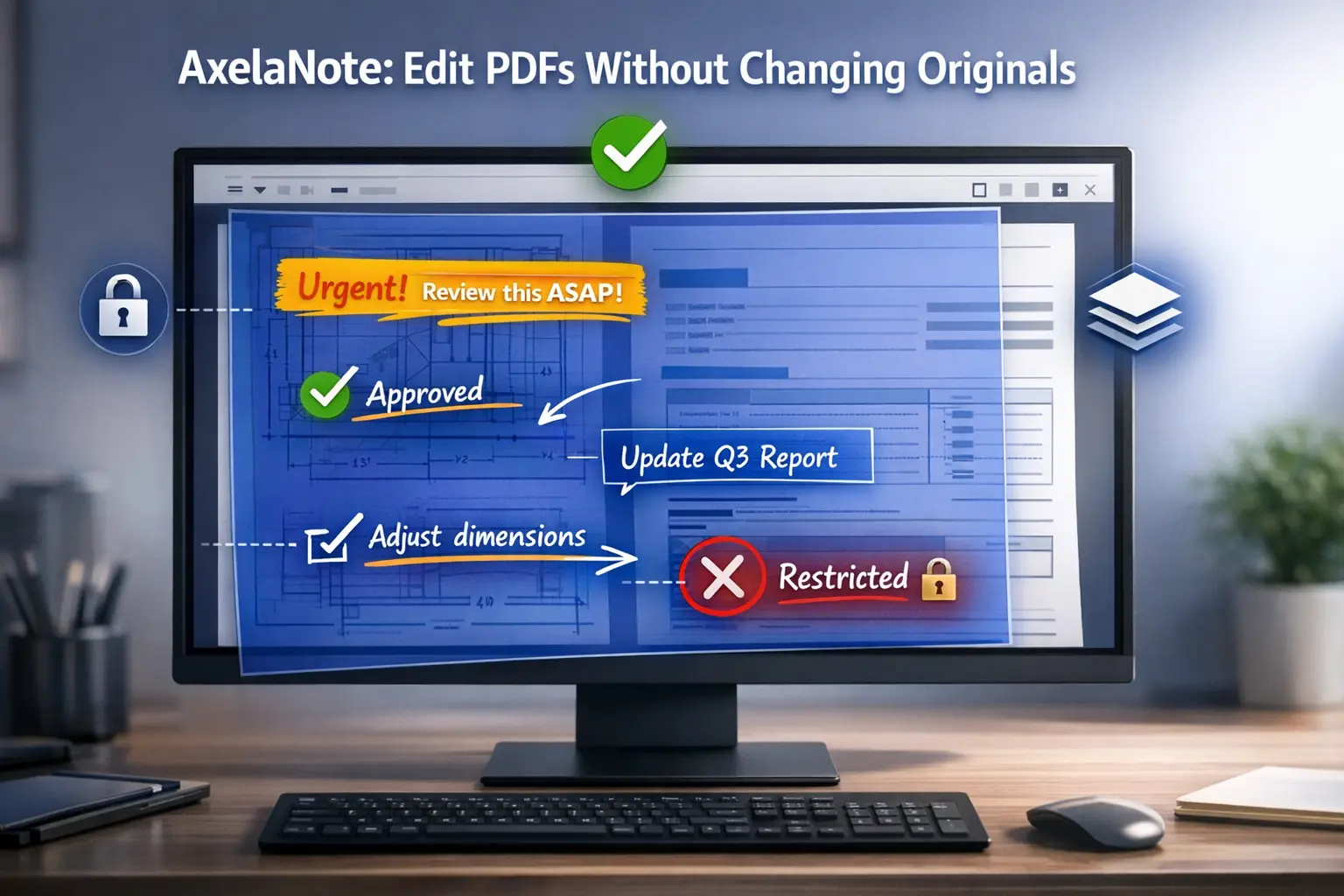
The attempt to edit a locked PDF document becomes impossible because three different restrictions prevent users from making changes. The features of standard PDF editors become unusable when they encounter files that block printing and restrict annotation. TransRecog created AxelaNote which serves this particular purpose.
The Windows software implements an entirely different solution. The software creates a virtual sheet that users can trace through their PDF document. The user creates content on the overlay which they do not need to touch the primary material. The outcome lets you change any PDF document while the original document remains intact.
AxelaNote provides a solution for users who have faced difficulties with government forms that lock their content and contracts that have access limitations and blueprints that need protection. The software has achieved recognition from NTT Data and Shimizu Corporation and Japan’s Ministry of Defense which proves its ability to function reliably in various industries.
Understanding the Transparent Layer Technology
The patented transparent sheet method establishes as the unique feature which distinguishes AxelaNote from other products. Most PDF editors embed your annotations directly into the document which leads to two problems because it damages the document’s formatting and activates security restrictions. AxelaNote sidesteps this entirely.
The software creates a separate layer file which it saves as .axl format to create a file that exists above your PDFdocument. You work with two files because you have the original PDF document and your markup layer. AxelaNote enables you to share your work by merging your documents into a standard PDF format which can be opened anywhere.
This approach brings three major advantages:
Original preservation: Your source PDF remains byte-for-byte identical. No accidental deletions, no format corruption, no worries about violating document integrity policies.
Restriction bypass: Since you’re not editing the PDF itself, annotation and print restrictions don’t apply to your transparent layer. You can mark up government forms, protected diagrams, and locked templates freely.
Version flexibility: Keep multiple markup versions of the same document without creating separate PDF copies. Switch between client feedback, supervisor edits, and final versions by loading different .axl files.
Key Features That Boost Productivity
AxelaNote packs practical tools for real-world document workflows:
Full pen and touch support: The software functions without problems for devices which use stylus pens to operate Microsoft Surface tablets. The system enables users to write with a pen and erase their work through finger movement which functions like a whiteboard. This method of interaction provides an ideal solution for making fast notes which different people use during their business meetings and outdoor assessments.
Template phrases: Save frequently-used comments as templates. Construction supervisors can store standard safety notes teachers can save common feedback phrases and contract reviewers can keep boilerplate comments ready to insert.
Outline extraction: The software can detect shapes and outlines in your PDF which it uses to create new editable objects from existing diagrammatic content. The system provides an efficient solution to identify specific elements in engineering drawings which engineers need to inspect.
Multi-monitor support: AxelaNote handles different DPI settings across multiple screens which enables the software to work with all display sizes from tiny laptop monitors to huge touchscreen interfaces used in conference rooms.
Companion tools included: Your license includes AxelaMerge for combining and reorganizing PDF pages plus AxelaDiff for comparing document versions side-by-side which you need to track changes in contracts or technical specifications.
Who Benefits Most from AxelaNote?
The software shines in several scenarios:
Companies that allow remote work to their employees prefer AxelaNote because its features work without needing to upload documents to cloud storage. The system uses local or corporate network storage to protect sensitive documents according to security standards, which allows users to write notes from home.
Construction and engineering firms: Field supervisors can use tablets at job sites to create drawings, which enables them to maintain original CAD-developed PDFs while adding their inspection remarks and change requests.
Educational institutions: AxelaNote helps university students take lecture notes by using AxelaNote to write research paper annotations. The affordable annual pricing ($3,900 per year for individuals, roughly $325 per month) makes it accessible for academic budgets.
Government agencies: Multiple municipalities have adopted the software for processing application forms. The capability to modify protected PDFs enables clerks to complete government documents without needing to print them first, which decreases both paper expenses and time needed for processing.
A municipal government in Japan reported that after implementing AxelaNote, their budget approval process became significantly faster. Staff members now have the ability to review financial documents digitally, which includes their ability to add handwritten notes, which removes the need to print documents for hand annotation before scanning and filing.
Common Challenges and Solutions
Challenge 1: Learning curve concerns
New users worry about mastering yet another piece of software. The design of AxelaNote’s interface uses common elements from drawing software to create a user-friendly experience. The majority of users achieve their first session productivity without needing to study the user manual.
Challenge 2: File compatibility
The .axl format raises questions about sharing work with clients who don’t have AxelaNote. The solution requires system users to export their work into standard PDF format before they can share their content. The merged output opens in any PDF reader.
Challenge 3: Performance with large files
The current version handles PDF documents that contain a maximum of 500 A4-sized pages and allows larger page sizes to decrease this limit. For massive architectural plans or lengthy reports, you might need to split documents—though this limitation affects most PDF editors.
Challenge 4: Platform restrictions
AxelaNote only runs on Windows 10 and 11. Mac and Linux users need alternative solutions or virtual machines.
Pricing and Licensing Options Explained
Individual users pay $3,900 annually or $390 monthly (prices in Japanese yen, roughly equivalent to USD). Corporate pricing varies based on volume and support needs.
The software offers two license types:
User licenses let one person install AxelaNote on up to three devices. This works well for professionals who switch between office desktops, home computers, and tablets.
Device licenses attach to specific machines rather than users. Organizations with shift work or shared workstations prefer this model—ten staff members sharing five computers would need five device licenses instead of ten user licenses.
All purchases include a 14-day free trial to test compatibility with your workflows and PDF types before committing.
Setting Up AxelaNote in Five Steps
Getting started is straightforward:
- Download the installer from TransRecog’s official website
- Run setup with administrator privileges (required for proper installation)
- Activate your trial or enter your license key if you’ve already purchased
- Open a PDF to see the transparent layer interface
- Start annotating using your mouse, keyboard, stylus, or touchscreen
The software requires .NET Framework 4.5 or higher and Visual Studio 2017 redistributables—both common components that likely already exist on your system. If missing, the installer prompts you to download them.
How AxelaNote Compares to Adobe Acrobat
The PDF market sees Adobe Acrobat Pro as its leading software solution while AxelaNote provides particular benefits for certain use cases. Adobe Acrobat shows full document functionality through its ability to edit standard files yet it encounters difficulties with protected documents. AxelaNote’s layer method enables users to access secured PDF files which Acrobat cannot open because of its error messages.
Small teams find AxelaNote more cost-effective than other options. The cost of Acrobat Pro reaches approximately $240 per user each year while AxelaNote costs about $325 per year with three device installations included for every license compared to Acrobat which allows two installations. Adobe offers complete document processing output through its PDF creation tools and OCR capabilities and form building software which AxelaNote does not provide. The all-in-one PDF suite from Acrobat delivers superior functionality compared to other options. The analysis shows that AxelaNote delivers greater worth because it provides secure document annotation tools which meet your essential requirements.
Real User Experiences and Results
The manufacturing business showed complete paper removal from its cleanroom areas because printed documents created contamination hazards. The engineers use AxelaNote through tablets to create digital inventory checklists which fulfill their hygiene and documentation needs.
The IT company applies the software to conduct manual changes and proofreading tasks. Technical writers collaborate on PDF documentation, with each reviewer adding comments on the transparent layer without corrupting the carefully formatted original files.
Teachers discovered unexpected benefits from their work. The professor explained that AxelaNote drawing tools enabled him to create a color-coding system for student feedback, which he found easier. He used green for positive notes, yellow for suggestions, and red for corrections.
The common thread across user testimonials? Relief at not needing to print, annotate physically, then scan documents back to digital format. The print-mark-scan cycle results in time wastage while multiple format changes lead to quality deterioration.
Maximizing Your AxelaNote Investment
The toolbar customization feature of AxelaNote enables you to set your most-used tools as your primary working tools. The interface needs immediate access to pen color controls because users need to switch colors multiple times.
The keyboard shortcuts become your essential workflow tool when you start learning the basic commands which allow you to perform common tasks like inserting text boxes and changing colors and toggling layers.
The AxelaNote system operates as a local application for security purposes which you can connect to your company’s file server and any approved cloud service. The system allows users to annotate documents while offline and later synchronize completed work when they establish an internet connection.
You can develop .axl files which contain pre-designed text boxes and check boxes for common document types including weekly reports and standard forms and inspection checklists. This process establishes a consistent method for your team members to perform their markup tasks.
The comparison tool in AxelaDiff, which comes with your license, reveals all modifications made between two different document versions. You must compare your marked document with the original document before you finalize your work to ensure you identified all missing elements.
What types of PDFs can AxelaNote edit?
AxelaNote works with virtually all PDF files, including those with annotation restrictions, print limitations, or copy protection. The transparent layer method allows users to bypass restrictions because it does not require them to change the protected PDF document. The software handles blueprints, forms, contracts, manuals, and reports which have a maximum length of 500 pages, measured in A4 size.
Does AxelaNote work without an internet connection?
Yes, AxelaNote operates completely offline once installed and activated. This makes it suitable for environments that require security because they restrict access to cloud-based applications. Your documents and annotations remain within your local network and personal device.
Can people without AxelaNote view my annotated PDFs?
Absolutely. When you complete your document markup process, you should export the document as a standard PDF through AxelaNote’s merge function. The output combines your transparent layer with the original into a regular PDF that opens in any reader—Adobe, browser viewers, or mobile apps.
Is AxelaNote compatible with Mac or Linux systems?
At present, AxelaNote supports only Windows 10 and Windows 11 operating systems. Mac and Linux users require Windows virtualization through Parallels or VMware to access the software but this method creates additional challenges and may lead to performance problems.
How does licensing work for team environments?
Teams choose between user licenses (tied to individuals, allowing three device installs each) or device licenses (tied to specific computers, ideal for shared workstations). A five-person team with dedicated computers needs five user licenses, while shift workers sharing equipment benefit from device licensing.
What happens to my files if I stop subscribing?
Your annotated .axl files become view-only without an active subscription. However, any PDFs you exported before your subscription ended remain standard PDFs that work forever. You must export your important marked-up documents to PDF format before your license expires because export to PDF is the only method that allows you to keep your editable annotations.
Can AxelaNote handle scanned PDFs or images?
The AxelaNote software works properly with scanned documents because it displays PDF annotations directly on both text and image content. The system lacks OCR capabilities which would allow users to search and edit scanned document text.
Next Steps: Making the Most of PDF Workflow Freedom
The AxelaNote solution addresses a common need which requires users to protect their PDF documents from direct editing while they make safe annotations. The transparent layer solution provides users with secure document protection, which enables them to work with locked government documents or original files needed for compliance purposes.
The software won’t replace full-featured PDF suites for everyone. Users who want to create PDF documents from nothing and use OCR technology and interactive form development should consider using more complete software solutions. The AxelaNote application streamlines your work because it enables you to mark up restricted PDFs without encountering any obstacles.
Download the 14-day trial to test it with your actual documents and workflows.Track your usage of annotation-blocked PDFs and your need to keep document originals intact. The AxelaNote solution provides users with major time savings and reduced difficulties when they need to print documents for annotation and scanning or when they deal with PDF restrictions using common editing tools.